
Switchboard · open source · beta
An agent harness where everything is a plugin.
Switchboard runs an AI agent on your own machine, in the terminal (sbx) or in a local web console. It reads and edits files, runs commands after you approve them, and can be reached from Telegram or Discord. Use it with BotConnector Cloud, your own provider key, or a model on your computer.
npm install -g @botconnector/switchboardNeeds Node.js 20.11 or newer (22 for the Discord channel). MIT licence. Source on GitHub · npm
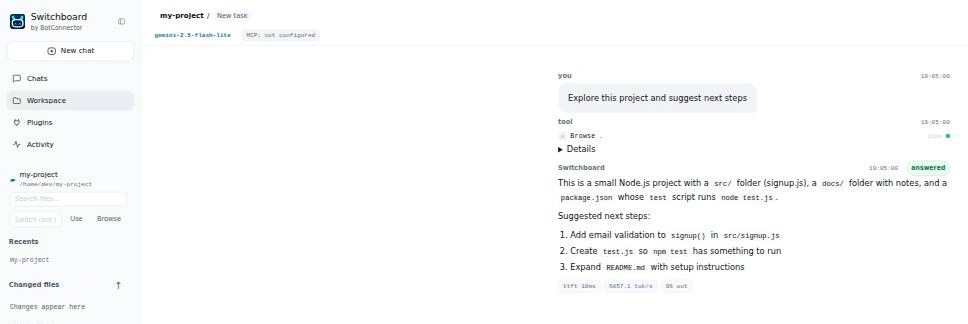
sbx web): your project and files on the left, the conversation on the right.Safe by default
- Approvals. Shell commands, file writes and MCP tools ask first (
riskymode). Answer once, for the session, or refuse. - Undo.
/changeslists what the agent wrote,/undorestores the files, and never overwrites a file you edited afterwards. - Sandbox. Run commands inside bubblewrap or Docker with no network and none of your environment.
- Local console.
sbx webonly listens on your own machine and checks every request.
What it can do
Work in a project
Read, write and search files, run commands, fetch web pages and search the web. Switch the project folder from the console with a folder browser.
Keep going when a model fails
List fallback models. If a free model is rate limited or down before it answers, the same request moves to the next one, and a failing model is skipped for a while.
Remember
Plain MEMORY.md notes you can read and edit, search across past sessions, and compaction that summarises old history.
Skills and presets
Reusable SKILL.md skills (the Agent Skills format) and presets that fix the prompt, model and tools for a job, such as a read-only code reviewer.
Delegate
Subagents work in parallel or in the background, with token and cost budgets, and recover after a restart without repeating finished work.
Connect tools
MCP servers (tools, resources and prompts), and a browser through Playwright MCP.
Chat from your phone
Telegram and Discord channels with approval buttons. Unknown people get a pairing code that you approve on your computer.
Run on a schedule
Cron automations run unattended and deliver the result to the console or a chat. Anything that needs approval is refused.
Script it
sbx run --json prints one JSON line per event and a final result with an exit code, for CI and scripts.
Commands
| Command | What it does |
|---|---|
sbx chat | Interactive session in the current folder (/new, /compact, /usage, /changes, /undo). |
sbx run "task" | Run one task and print the answer. Add --json for machine-readable output. |
sbx web | Open the local web console at 127.0.0.1:7777. |
sbx doctor | Check the configuration, the endpoint and your key. |
sbx channels | Run Telegram and Discord; sbx channels pairing | approve | revoke manage who may talk to it. |
sbx automations | Add, list and run scheduled tasks. |
sbx skills · sbx memory · sbx presets | Manage skills, notes and agent presets. |
--preset · --sandbox · --approval | Choose the preset, run commands in a sandbox, or change how often it asks. |
Set BOTCONNECTOR_API_KEY to use BotConnector Cloud, or add your own provider in Settings. Not sure which tool fits? BCCLI is the coding agent for the terminal; Switchboard is the open harness for building your own agent setups. Full documentation